


Intuit QuickBooks for Business
4.713.69K Reviews
App Specs
- Version
- 30.4.7
- Updated On
- License
- Free
- Downloads
- 5,000,000+
- Developer
- Intuit Inc
- Categories
- Business
- Platform
- Android, iOS
Screenshots
 Analysis by AppCompare
When I’m deciding whether a business finance app is worth adopting, I look beyond the feature list: will it help me keep records in order during a busy week, and does its cost make sense for the way I work? Intuit QuickBooks is a business accounting app from Intuit Inc, and its appeal is the chance to bring routine money tasks into one working system rather than treating invoices, expenses, and reports as separate chores.
What the free access does—and doesn’t—tell you
The app is free to download, which makes it easy to explore without paying just to install it. That is useful if you want to see whether a mobile accounting workflow suits you before changing how you manage business records. The app also offers in-app purchases, with listed item prices ranging from $0.99 to $420.00. Those figures describe the range of purchases, not a single fixed subscription price, so I would check the current options and terms in the app before deciding what ongoing access will cost.
That distinction matters: free access is not the same thing as a promise that every accounting feature will remain free. I’d treat the initial download as a chance to assess fit, then compare the specific paid option you need with your current bookkeeping costs. If you only need a simple way to jot down income and expenses, paying for a larger accounting setup may be unnecessary. If you need invoicing, organized transaction records, and business reporting together, the value depends on how much time that joined-up workflow saves you.
Streamlining Your Business Finances
So, let’s dive right in. Intuit QuickBooks is a powerhouse when it comes to managing business finances. Whether you’re a small business owner or running a larger operation, this app has got you covered. What I love about it is how it brings all your financial data under one roof. Gone are the days of flipping through spreadsheets, trying to make sense of it all.
User-Friendly Interface
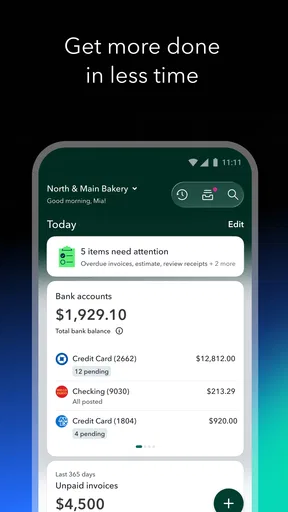
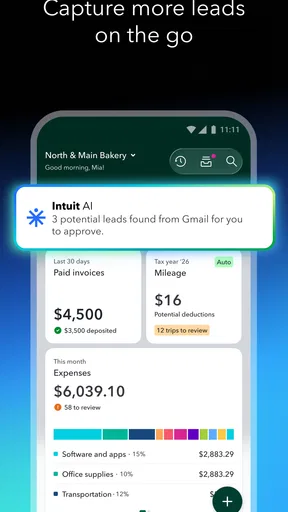
Now, I’m not going to lie, I’m no financial wizard. But the user-friendly interface made me feel like one! Seriously, QuickBooks has nailed it in terms of design. It’s intuitive and easy to navigate, which means even if you’re just starting out, you won't feel overwhelmed. The dashboard is clean, and everything’s just a click away.
Features That Make Life Easier
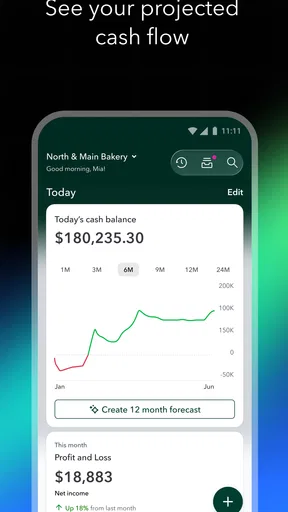
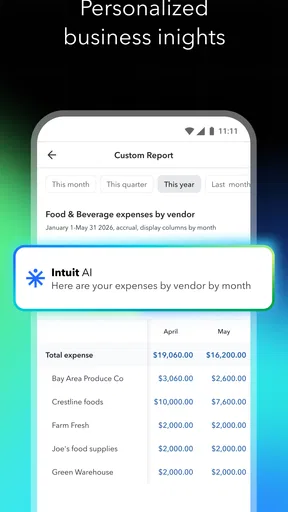
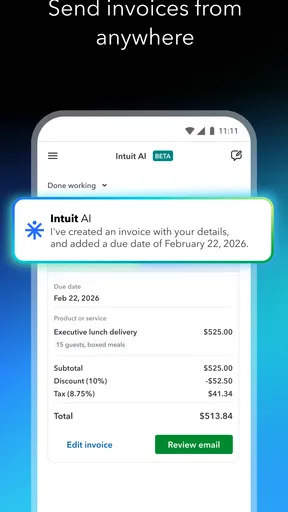
Let’s talk features. From tracking expenses to creating invoices, QuickBooks does it all. The app can even sync with your bank accounts, which is a game-changer. It automatically updates your transactions, so you’re always up to date. Plus, the reporting feature is a dream. You can generate detailed reports that are perfect for analyzing your business performance.
And if you’re like me and dread tax season, QuickBooks has your back. It helps you track your income and expenses throughout the year, so when tax time arrives, you’re not scrambling for numbers.
Worth Reading Before You Choose

Flipboard Shows What News Apps Must Do Beyond the Feed

Switching to Android Auto Means Rethinking Your Driving Routine

Google Calendar Makes a Crowded Week Easier to Manage

Ludo King Makes the Most of the Minutes Between Plans

Baby Panda World Brings Quick Play to Modern Phones, but Its Game Library Feels Busy

ESPN’s Live Game View Makes Following Close Games Easier
Putting daily bookkeeping to work
The biggest practical difference comes from what you do with transactions after they appear. I’d make a short review part of the weekly routine: check unfamiliar bank activity, assign expenses to sensible categories, and add a note when a purchase needs context. A tidy record is more useful than a long list of uncategorized charges when you later need to explain a business cost to yourself or your accountant.
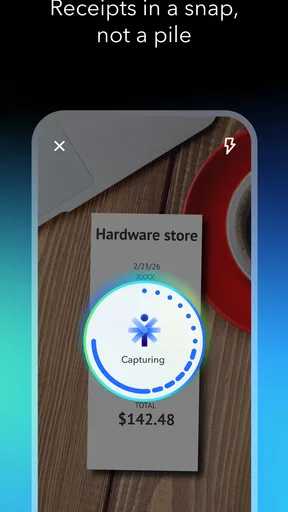
For a self-employed designer, for example, the day might begin with checking a client payment, continue with photographing a supply receipt, and end with sending an invoice after a project handoff. Keeping those steps close to the accounting record can reduce the chance that a receipt gets lost in a bag or an invoice waits until the next time the designer sits at a desk. The benefit is not that bookkeeping disappears; it becomes a series of smaller actions.
Receipt capture and mileage tracking are especially useful when work happens away from the office. My tip is to record the purpose while the detail is fresh, rather than relying on a vague note weeks later. For a trip, that means distinguishing a business journey from an ordinary errand in your records. For a receipt, it means adding enough context to remember what the purchase supported. The scanner can help bring a receipt into the workflow, but it does not decide whether an expense is correctly classified.
On-the-Go Access
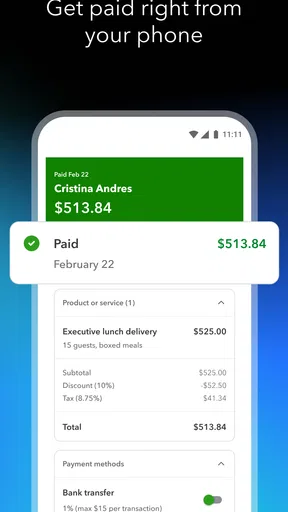
In our fast-paced world, being tied to a desk isn’t always an option. With the QuickBooks mobile app, you can manage your finances on the go. Whether you’re at a café or on a flight, your business is always at your fingertips. I’ve found this super handy for sending invoices right after a meeting or checking my cash flow during a coffee break.
Where convenience needs a second look
Mobile access is most valuable for quick tasks, not necessarily for every accounting decision. I would use a phone to capture a receipt, check whether an invoice has been sent, or glance at incoming and outgoing activity; I’d reserve a more careful review for a quiet moment when I can compare records and think through unusual transactions. A small screen makes it easy to act quickly, but speed is not a substitute for checking the details.
Bank syncing can save manual entry, yet imported transactions still need attention. A bank feed tells you that money moved; it cannot always tell you the business reason behind that movement. I’d review the feed regularly, watch for duplicates or items that need clarification, and avoid assuming that every imported line is ready for reporting. If you share bookkeeping with an accountant or another person, agree on who handles categorization and review so that work is not repeated or left unfinished.
There is also a learning trade-off. A clean dashboard can make the first steps approachable, but accounting terms and category choices still matter. If your finances involve unusual tax treatment, complex inventory, or detailed compliance needs, a convenient mobile app may not be enough on its own. I’d use it as part of a process that includes qualified advice where appropriate, rather than treating an automatically generated report as a final professional judgement.
How it compares with simpler bookkeeping
The usual alternative for a very small operation is a spreadsheet, a notes app, and separate invoicing tools. That approach can be cheaper and perfectly workable when transactions are few and predictable, but it relies on you to keep several records aligned. QuickBooks makes more sense when you want invoices, expense tracking, bank activity, and reports connected in one accounting workflow. The trade-off is that a broader system asks you to learn its setup and maintain the records consistently.
It is not automatically the best fit for every business. Someone who only needs to send an occasional invoice may prefer a focused invoicing tool with less accounting structure. A business with complicated bookkeeping may need desktop work, specialist support, or a more tailored system alongside mobile access. I see QuickBooks as a stronger choice when everyday transactions are numerous enough that scattered records become a real burden, but not as a substitute for choosing the right accounting method for a business’s particular obligations.
Customer Support That Stands Out
Now, let’s talk support. We all know that feeling when something goes awry, and you need help ASAP. QuickBooks offers stellar customer support. Whether it’s through chat, email, or phone, their team is ready to assist. I had a minor hiccup setting up my account, and their support team was quick to resolve it. That’s a big win in my book.
Support can be reassuring when you are setting up records or trying to understand a workflow, but I would still go into onboarding with a little preparation. Decide which bank activity belongs to the business, gather the information you use on invoices, and think about how you want to label common expenses. A consistent setup early on makes later reports easier to interpret. If you are moving from spreadsheets, keeping the old records available during the transition gives you a reference point while you learn the new routine.
Who gets the most from it
I’d recommend considering it if you run a small business or work independently and regularly need to invoice clients, keep expense evidence, monitor transactions, and review business performance. It is also a practical option for someone who spends much of the day away from a desk and wants to handle brief finance tasks while details are still fresh. The app has a 4.7 average from around 71,000 ratings, and it has passed 5 million installs, signs that it is widely used—but popularity alone cannot tell you whether its paid options suit your own workflow.
On the other hand, I would skip it if you have almost no business transactions and a basic spreadsheet already gives you a clear, reliable picture. I’d also pause if you are looking for a free, fully featured accounting system: the app is free to download, but in-app purchases range from $0.99 to $420.00 per item, so you should check what access costs for the functions you actually intend to use. It is aimed at everyone by age rating, but that does not mean every accounting concept will feel simple without some learning.
For a first-time user, the most useful question is not simply whether the app can make an invoice or show a report. Ask whether you will keep the records current, whether the reporting matches the decisions you need to make, and whether the relevant paid option is worth the time saved. The current version is 29.42.0+3 and the app has been available since June 29, 2011; those details identify the product, but I would still judge it by the fit of its present workflow and cost for my own business.
Wrapping things up, if you’re looking for a reliable app to manage your business finances, give Intuit QuickBooks a whirl. It’s packed with features and designed to make your life easier, all while keeping your finances in check. Plus, with its mobile accessibility and solid customer support, you’ll wonder how you ever managed without it.
So, why not take it for a spin? Your business will thank you!
Pros
- User-friendly interface for easy navigation.
- Seamless integration with bank accounts.
- Comprehensive invoicing features.
- Real-time financial reporting.
- Excellent customer support.
Cons
- Higher cost for premium features.
- Limited mobile app functionality.
- Occasional sync issues with banks.
- Learning curve for advanced tools.
- Requires stable internet connection.
FAQs for Intuit QuickBooks for Business
What features does Intuit QuickBooks for Business offer?
Intuit QuickBooks for Business provides a comprehensive suite of features designed to meet the needs of small to medium-sized businesses. These include invoicing, expense tracking, payroll management, tax preparation, and financial reporting. The app also integrates with various third-party services, enhancing its functionality and adaptability for different business needs.
Is Intuit QuickBooks compatible with both Android and iOS devices?
Yes, Intuit QuickBooks for Business is available on both Android and iOS platforms, ensuring that users can access their financial data on the go, regardless of their device preference. The app is optimized for mobile use, providing a seamless experience across smartphones and tablets, and syncing with the desktop version for consistent data management.
How secure is my financial data in Intuit QuickBooks?
Intuit QuickBooks prioritizes the security of your financial data by employing advanced encryption methods and regular security updates. It also offers features like two-factor authentication and user permissions to protect sensitive information. The app is designed to comply with industry standards, ensuring that your data remains safe and confidential.
Does Intuit QuickBooks offer customer support to assist with technical issues?
Yes, Intuit QuickBooks provides robust customer support to assist users with any technical issues or questions. Support options include live chat, email assistance, and a comprehensive online help center with tutorials and guides. Premium users may also have access to dedicated support representatives for more personalized assistance.
Can Intuit QuickBooks handle multiple currencies and international transactions?
Intuit QuickBooks supports multiple currencies, making it an excellent choice for businesses that engage in international transactions. Users can manage exchange rates and process transactions in various currencies, which is particularly beneficial for companies with global clientele or suppliers. This feature helps maintain accurate financial records and simplifies international accounting.


